Showing posts with label SQL Server. Show all posts

Monday, June 2, 2014

Error 5644 when trying to enable a SQL Server notification receive location in BizTalk Server

When using the SQL Server broker functionality in order to have SQL Server push notifications to BizTalk instead of polling a table, I've found that the following error is quite common to encounter.

 The Messaging Engine failed to add a receive location "Event1" with URL "mssql://localhost//EventDB" to the adapter "WCF-Custom". Reason: "Microsoft.ServiceModel.Channels.Common.TargetSystemException: The notification callback returned an error. Info=Invalid. Source=Statement. Type=Subscribe.
The error message tells you that the statement entered is invalid, but not in which way. There are a lot of rules to comply with that all are available on MSDN: http://msdn.microsoft.com/en-us/library/ms181122.aspx And beside the "normal" ones such as "do not use aggregate functions" and "do not use an asterisk to define the resultset", one that constantly haunts me are "table names must be qualified with two-part names", meaning that you have to prefix all tables with the schema name, such as "dbo.EventTable". Just using select blah from EventTable where processed=0 will generate the error above.

Thursday, May 29, 2014

SQL Server: Invalid prefix or suffix characters error message

When trying to do different operations in SQL Server Management Studio such as "Edit Top 200 Rows", you might get the error message "Invalid prefix or suffix characters. (MS Visual Database Tools)".


This is most likely due to the fact that the Management Studio tool is an older version than the database you are connected to and trying to perform the operation on. For instance, using SQL Server Management Studio for SQL Server 2008R2 and connecting to a SQL Server 2012 database will render the above error message when trying to perform the "Edit Top 200 Rows" operation on a table or view.

The solution is to use the same version of Management Studio as the database in question.

Friday, March 7, 2014

Recreating a BizTalk Active Directory group will cause access to BizTalk to fail

When setting up and configuring a BizTalk environment you will also add the necessary Active Directory groups to allow access for different accounts to the platform.

In most cases, you will not touch these groups again, but there might come a time when you remove and add the groups with the same name within Active Directory. Doing so will change the SID of the group and it will no longer match the SID stored in SQL Server for the Login.

Trying to access the BizTalk Server Administration Console as a BizTalk Server Operator will for instance yield the following error when the corresponding AD group has been recreated:


You will get an error saying "BizTalk Server cannot access SQL Server. [...] Access permissions have been denied to the current user. [...] Login failed for user [...]".

You will also notice a logged error in SQL Server saying that "Login failed for user [...] Reason: Could not find a login matching the name [...]"

When looking at both the Active Directory accounts/groups as well as the SQL Server security settings, everything will look ok.

In order to correct this, you will have to remove and then add the corresponding Login in SQL Server. This might also cause you to have to delete and then add the corresponding User in the different BizTalk Databases (in general the BizTalkMgmtDb, BizTalkDTADb and BizTalkMsgBoxDb). This will also be notified by SQL Server when removing the Login.

After doing these remove/adds in SQL Server, you should be able to access the resources as expected.

Note that this is documented briefly in the Troubleshooting BizTalk Server Administration page on MSDN, but you more or less have to know where/and for what to look in order to find it.

Saturday, March 23, 2013

MSDTC error after cloning a virtual machine

A common development task is to clone virtual servers for different development scenarios. I myself have a bunch of virtual servers configured that I clone in order to get new fresh installs to lab with. However, when cloning machines in a BizTalk setup, you have to be aware of the issues that can develop due to the need for unique identification keys in MSDTC. When cloning a server to two instances and using one for SQL Server and the other as the BizTalk application server, MSDTC will not work. When running DTCTester the following error will appear:


Error: SQLSTATE=24000,Native error=0,msg=[Microsoft][ODBC SQL Server Driver]Invalid cursor state
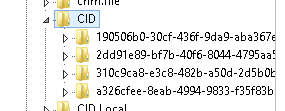
 The reason in this case is that the CID GUID is not unique on the servers.

Run regedit and browse to HKEY_CLASSES_ROOT\CID\ and find the GUID where Description is set to MSDTC (it is one of the four). The GUID should be exactly the same on the other server.


In order to fix this, you have to uninstall and then install MSDTC again (or you could go the wild path and just set another GUID). Uninstalling/installing MSDTC is done via the command prompt.

Open a command prompt as administrator and run the command
msdtc -uninstall
followed by
msdtc -install
Verify that the DTC coordinator has started up and check the CID values in the registry. When running MSDTCTester again it should show a successful result:


This error will be caught by the BizTalk MessageBox Viewer. It will show an error of
is duplicated on servers and - Check if < server1> and are not cluster nodes as CID must be unique on non-clustered servers!

Friday, June 29, 2012

How to move the LiteSpeedCentral database

We are running LiteSpeed at work in order to compress our backups in SQL Server. I was tasked with moving the LiteSpeedCentral database from one SQL server to another. A simple task one might think.

By a quick search, I found a support ticket that says that you simply do a backup/restore of the database and a reconfiguration of the LiteSpeed client on each server. Simple enough, I did that.

The reconfiguration could have been easier, i.e. swap "old server" for "new server" instead of having to reconfigure everything, but sure enough, it worked.

I then got a lot of warnings on my old SQL Server telling me that some service on the LiteSpeed application server is trying to connect to the database but is failing.


I did some digging trying to find out what was causing this. The warnings came with an interval of fifteen minutes which narrowed it down to the SQL Server Agent job LiteSpeed for SQL Server Update Native Backup statistics and more specifically the query exec [LiteSpeedLocal]..[LiteSpeed_ImportNativeHistory]. When I ran this manually, it executed without errors but I still got the login failures logged on the old SQL Server.

No matter what I did to reconfigure the LiteSpeed application I could get rid of this warning. Finally I managed to find a dicussion on the Quest support forum that pointed me to the registry where I could find entries that were left pointing to the old Central Database Server. They were at HKLM/SOFTWARE/Imceda/SQLLiteSpeed/Engine/ActivityServers/[Database]/ Deleting these entries solved my issue.

So seriously Quest. Is it so hard to have a properly documented procedure for moving the database? It should be a pretty common task for customers to have to do..

Friday, November 19, 2010

Calling stored procedures from BizTalk (and other applications) and the FMTONLY flag

Most developers will run into the issue of not being able to generate metadata from a stored procedure even though it is perfectly valid and can be accessed and run without a hitch from the SQL Server Management Studio or directly from code. A lot of the time there will be an error message on the lines of


Error while retrieving or generating the WSDL. Adapter message: Retrieval of Operation Metadata has failed while building WSDL at 'TypedProcedure/dbo/FetchTestData'

Microsoft.ServiceModel.Channels.Common.MetadataException: Retrieval of Operation Metadata has failed while building WSDL at 'TypedProcedure/dbo/FetchTestData' ---> System.Data.SqlClient.SqlException: Invalid object name '#temp01'.
at System.Data.SqlClient.SqlConnection.OnError(SqlException exception, Boolean breakConnection)
at System.Data.SqlClient.SqlInternalConnection.OnError(SqlException exception, Boolean breakConnection)
...

In some cases there will be no error at all (SSIS is prone to this for example).

The above error message will give us something to go on though. When reviewing the stored procedure we can see that a temporary table is created and filled with data. Later on this table is used in a select in order to return data to the client. Nothing unusual, still it fails. The stored procedure looks like this (never mind the necessity of the temp table, it is just a demo of the issue):

ALTER PROCEDURE [dbo].[FetchTestData]
(@a4 varchar(4))
AS
SELECT t1, t2, t3 INTO #temp01 FROM Table_1
SELECT t1, t2, t3 FROM #temp01
RETURN

The next step is then to run profiler during a run of the generate wizard to see what is actually happening in the background. How does the metadata get generated by the wizard and why does it fail?

When running the generation, we can see the following bits in the trace

SET FMTONLY OFF; SET FMTONLY ON;
exec [dbo].[FetchTestData] @a4=NULL
SET FMTONLY OFF;

Now we are getting somewhere. The FMTONLY setting is used in order to not process any rows but just return response metadata to the client. However, our stored procedure uses a temporary table which FMTONLY=ON will cause to not be created since any modifications are allowed to be made. When trying to do a select on the temporary table, it will fail since it never was created causing the error messages mentioned above.

There is a way around this issue though. Since we know what is happening, we can revert the execution of SET FMTONLY ON that the adapter does before the execution of the procedure. We should however not just add a command of SET FMTONLY OFF to the beginning of our procedure. Actually executing the entire procedure which such a solution will result in might not be a good choice. If we only do a select on data it is fine, but if the procedure also includes insert, update and delete statements, these will be called as well.

Instead, we check for the FMTONLY flag early on and if it is set, we switch it off when needed and then switch it back on again. Our modified and metadata-generation-secure procedure now look like this:

ALTER PROCEDURE [dbo].[FetchTestData]
(@a4 varchar(4))
AS
DECLARE @FmtOnlyIsSet bit = 0
IF (1=0) BEGIN SET @FmtOnlyIsSet = 1 END
IF @FmtOnlyIsSet = 1
   SET FMTONLY OFF

SELECT t1, t2, t3 INTO #temp01 FROM Table_1

IF @FmtOnlyIsSet IS NULL
   SET FMTONLY ON

SELECT t1, t2, t3 FROM #temp01

RETURN

What magic is done here?

First, we declare a variable that can hold the current setting for the FMTONLY flag, we call it @FmtOnlyIsSet and set it to false by default.

The IF (1=0) bit may look a bit off, but is in fact quite clever. When FMTONLY is set to ON, all conditional statements will be ignored but the content will be executed. This since all possible return paths has to be checked. By checking for an impossible match (1=0) we can be sure that the statement inside the IF will be run only if FMTONLY is ON. Hence we set our FMTONLY flag to true here.

Then we simply check if our flag is set to true when needed and if so, switch off the FMTONLY setting. Afterwards we do the same check and switch it back on. This part is important due to what I mentioned above. If we don't switch the FMTONLY setting back on, all statements will be run just as in a normal execution of the procedure which might not be wanted.


It is noteworthy to know that the FMTONLY setting not only will be used during metadata generation in development, but also when actually calling the procedure from the application. I noticed this when using typed datasets in BizTalk server with the WCF-SQL adapter. I couldn't do alterations to the stored procedure which I handled by instead doing a mock procedure to generate schemas from. Then I assumed that I could safely call the original procedure from BizTalk but I still got the invalid object error message. A quick look in Profiler showed that the adapter will do two passes to the stored procedure. First once with FMTONLY set to ON and then one without to actually execute the code.

My guess is that the adapter is smart enough to do a check that the signature for the procedure matches the previously generated and deployed metadata before executing code that could change data in the database. If the returned dataset wouldn't match the schema, we would know before any code has been executed.

I have only seen this when using typed datasets though which make sense. By using the technique described above, it isn't an issue at all. I'd rather like the idea that the contract is checked first before executing the procedure. It is also not posing a performance hit. The result from the metadata extraction will be cached so only the first call will need to fetch metadata. I am still not sure for how long the metadata is cached before it is refreshed in a call but it seems to hold it for quite a while.